
最終投稿日:2026年07月26日
以前コロナ過の際、自治体で助成金の申請をデジタルで受け付けたらしいのですが、
何とバリデーションが実装されてなかったらしいですよ。
当然窓口の方が早いとなりましたとさ。
本当に国や自治体のやる事って『フジコフジコ...』 Jakarutaのバリデーションは以下3個用意されています。
『xhtml内バリデーション』『ビーンバリデーション』『カスタムバリデーション』 今回取り上げるのは『ビーンバリデーション』となります。
このバリデーションを使うには依存関係を整える必要があります。
<!-- ビーンバリデーション -->
<dependency>
<groupId>jakarta.validation</groupId>
<artifactId>jakarta.validation-api</artifactId>
<version>3.0.2</version>
</dependency>
<dependency>
<groupId>org.hibernate.validator</groupId>
<artifactId>hibernate-validator</artifactId>
<version>8.0.3.Final</version>
</dependency>
<dependency>
<groupId>org.glassfish.expressly</groupId>
<artifactId>expressly</artifactId>
<version>5.0.0</version>
</dependency>
| @NotNull | [null]を弾く(ブランクは通します) 例)@NotNull(message = "必須入力です") |
| @NotEmpty | [null]含め空を弾く(文字列、List、Mapなどに使える) 例)@NotEmpty(message = "必須入力です") |
| @NotBlank | [null]含めtrimした状態の空を弾く(全角スペースは除く) 例)@NotBlank(message = "必須入力です") |
| @Size | 文字数や要素数を確認し弾く(文字列、List、Mapなどに使える) 例)@Size(min = 3, max = 10, message = "数字は{min}以上、{max}以下で入力してください") |
| @Pattern | 正規表現で弾く 例)@Pattern(regexp = "^[0-9]+$", message = "数字のみです") 例)@Pattern(regexp = "^[0-9]{3}-[0-9]{4}$", message = "郵便番号のみです") |
| @Min | 指定した数値以上であること(自然数が良い) 例)@Min(value = 1, message = "数量は{value}個以上で入力してください") |
| @Max | 指定した数値以下であること(自然数が良い) 例)@Max(value = 1, message = "数量は{value}個以下で入力してください") |
| @DecimalMin | 指定した数値以上であること(少数点あっても正確) 例)@DecimalMin(value = "0.01", message = "数値は{value}以上で入力してください") |
| @DecimalMax | 指定した数値以下であること(少数点あっても正確) 例)@DecimalMax(value = "9.01", message = "数値は{value}以下で入力してください") |
| @Positive | 0より大きい(正の数)であること 例)@Positive(message = "数値は0より大きい値を入力してください") |
| @PositiveOrZero | 0以上(正の数または0)であること 例)@PositiveOrZero(message = "数値は0以上を入力してください") |
| @Negative | 0より小さい(負の数)であること 例)@Negative(message = "数値は0未満を入力してください") |
| @Past | 過去の日付(現在より前)であること(例:生年月日) 例)@Past(message = "生年月日は過去の日付を入力してください") |
| @PastOrPresent | 過去または現在の日付であること 例)@PastOrPresent(message = "入社日は今日、または過去の日付を入力してください") |
| @Future | 未来の日付であること 例)@Future(message = "予約日は明日以降の日付を入力してください") |
| @AssertTrue | 値が『true』であること 例)@AssertTrue(message = "利用規約に同意してください") |
| @AssertFalse | 値が『false』であること 例)@AssertFalse(message = "現在この手続きを進めることはできません") |
@Getter
@Setter
@NotBlank(message = "名前は必須入力です")
private String name;
ただし何か殺風景ですね。
試しに『h:messages』を以下の様に変更してみましょう。 <h:messages errorClass="alert-danger" warnClass="alert-warning" infoClass="alert-info" layout="list" /> もっと殺風景になりましたねw しかしHTMLソースを見てください。 <ul><li class="alert-danger">名前は必須入力です </li></ul> そうです『class="alert-danger"』が付与されてるではありませんか!
もうお分かりですね『CSS』を自作しましょう!
/* エラー用全体CSS(alert-danger ) */
li.alert-danger {
background: none !important;
border: none !important;
box-shadow: none !important;
margin: 0 !important;
padding: 0 0 10px 24px !important;
color: #c92a2a;
font-size: 0.95rem;
font-weight: 500;
line-height: 1.6;
position: relative;
border-bottom: 1px dashed rgba(255, 77, 77, 0.15) !important;
}
li.alert-danger:last-child {
border-bottom: none !important;
padding-bottom: 0 !important;
}
li.alert-danger::before {
content: "⚠";
position: absolute;
left: 0;
top: 0;
color: #ff4d4d;
font-weight: bold;
font-size: 1.1rem;
}
ul:has(> li.alert-danger) {
margin: 20px 0;
padding: 18px 24px;
background: linear-gradient(135deg, #fffafa 0%, #ffebeb 100%);
border-left: 5px solid #ff4d4d;
border-radius: 10px;
box-shadow: 0 4px 16px rgba(255, 77, 77, 0.06);
list-style: none;
}
/* 警告用全体CSS(alert-warning ) */
li.alert-warning {
background: none !important;
border: none !important;
box-shadow: none !important;
margin: 0 !important;
padding: 0 0 10px 24px !important;
color: #d97706;
font-size: 0.95rem;
font-weight: 500;
line-height: 1.6;
position: relative;
border-bottom: 1px dashed rgba(245, 158, 11, 0.15) !important;
}
li.alert-warning:last-child {
border-bottom: none !important;
padding-bottom: 0 !important;
}
li.alert-warning::before {
content: "⚠️";
position: absolute;
left: 0;
top: -5px;
color: #f59e0b;
font-weight: bold;
font-size: 1.1rem;
}
ul:has(> li.alert-warning) {
margin: 20px 0;
padding: 18px 24px;
background: linear-gradient(135deg, #fffbeb 0%, #fef3c7 100%);
border-left: 5px solid #f59e0b;
border-radius: 10px;
box-shadow: 0 4px 16px rgba(245, 158, 11, 0.06);
list-style: none;
}
/* 情報用全体CSS(alert-info ) */
li.alert-info {
background: none !important;
border: none !important;
box-shadow: none !important;
margin: 0 !important;
padding: 0 0 10px 24px !important;
color: #0369a1;
font-size: 0.95rem;
font-weight: 500;
line-height: 1.6;
position: relative;
border-bottom: 1px dashed rgba(14, 165, 233, 0.15) !important;
}
li.alert-info:last-child {
border-bottom: none !important;
padding-bottom: 0 !important;
}
li.alert-info::before {
content: "ℹ️";
font-size: 1.1rem;
position: absolute;
left: 0;
top: -3px;
color: #0ea5e9;
font-weight: bold;
}
ul:has(> li.alert-info) {
margin: 20px 0;
padding: 18px 24px;
background: linear-gradient(135deg, #f0f9ff 0%, #e0f2fe 100%);
border-left: 5px solid #0ea5e9;
border-radius: 10px;
box-shadow: 0 4px 16px rgba(14, 165, 233, 0.06);
list-style: none;
}
/* テキストボックス用エラー用スタイル */
.parts_text_err {
border-radius: 6px;
border: 1px solid #f00;
}
.parts_text_err:hover {
border-radius: 6px;
border: 1px solid #f00;
box-shadow: 0 0 5px rgba(153, 0, 0, 0.5);
}
.parts_text_err:focus {
border: none;
outline:solid 1px #f00;
}
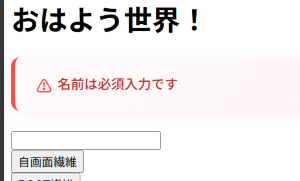 綺麗なレイアウトになりましたね!



<h:form id="sample_form">
<h:messages globalOnly="false" showSummary="true" showDetail="false" style="color:red;font-weight:bold;list-style-type:none;" />
<h:inputText id="inpText" value="#{sampleBean.name}" />
</h:form>